Extended Data Types
An Extended Data Type (EDT) is an AOT object that extends one of the system's primitive data types (string, integer, real, date, etc.) with additional metadata: labels, help text, string sizes, formatting rules, and relations. EDTs are the standard mechanism for defining reusable, semantically meaningful data types across the entire application.
Every table field, form control, method parameter, and variable in D365 F&O should reference an EDT rather than a raw primitive type. This ensures consistent labels, validation, formatting, and lookup behaviour wherever the same concept appears.
Primitive Data Types
D365 F&O provides the following primitive (base) data types. Each EDT must ultimately derive from one of these:
| Primitive Type | X++ Type | SQL Type | Description |
|---|---|---|---|
| String | str | nvarchar(n) | Variable-length Unicode text. Size controlled by StringSize. |
| Integer | int | int | 32-bit signed integer. |
| Int64 | int64 | bigint | 64-bit signed integer. Used for RecId and large counters. |
| Real | real | numeric(p,s) | Fixed-point decimal. Scale controlled by Scale and NoOfDecimals. |
| Date | date | date | Calendar date without time component. |
| Time | timeOfDay | int | Time of day stored as seconds since midnight (0–86399). |
| UtcDateTime | utcdatetime | datetime2 | Date and time in UTC. The runtime converts to/from user time zones. |
| Enum | enum | int | Integer value backed by a base enumeration. |
| Container | container | varbinary(max) | Binary-serialised X++ container. Not searchable or indexable. |
| Guid | guid | uniqueidentifier | 128-bit globally unique identifier. |
EDT Inheritance
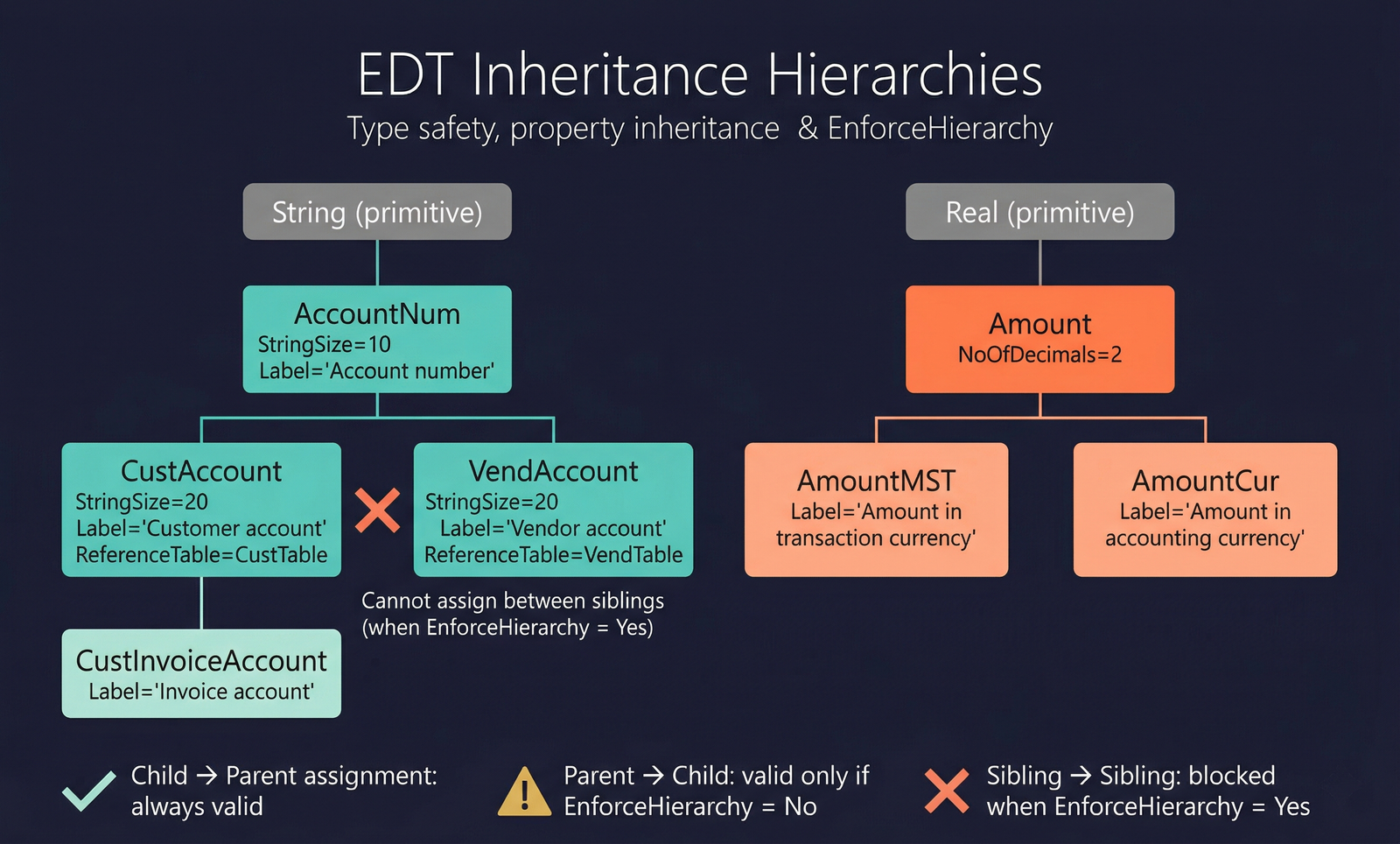
One of the most important features of EDTs is inheritance. An EDT can extend another EDT using the Extends property, forming a parent–child chain. The child EDT inherits all properties from its parent and can override any of them.
How Inheritance Works
- When you set the
Extendsproperty on an EDT to the name of another EDT, the child inherits all of the parent's settings: label, help text, string size, relations, formatting, and display properties. - The child can override any inherited property by setting it explicitly. Properties left at their default inherit from the parent at runtime.
- Inheritance chains can be multiple levels deep (e.g.,
AccountNum→CustAccount→CustVendAccount). - The base type (string, int, real, etc.) is determined by the root EDT in the chain and cannot be changed by child EDTs.
See Code Examples for inheritance patterns in X++.
EnforceHierarchy
The EnforceHierarchy property controls whether the compiler enforces type safety across the EDT inheritance hierarchy:
- EnforceHierarchy = Yes — assignments and comparisons between EDTs must respect the hierarchy. You cannot assign a
VendAccountto aCustAccountvariable even though both extendAccountNum, because they are sibling types. - EnforceHierarchy = No (default) — the compiler treats all EDTs of the same primitive base type as interchangeable (legacy behaviour).
Microsoft best practice: set EnforceHierarchy = Yes on new EDT hierarchies. This catches type-mismatch bugs at compile time rather than producing silent data errors at runtime.
Creating an EDT
To create a new EDT in Visual Studio:
- Right-click your project → Add → New Item → EDT String (or EDT Integer, EDT Real, etc.).
- Set the Name property (PascalCase, e.g.,
CustAccount,TransDate,AmountMST). - Set Label and HelpText using label IDs for translation support.
- Optionally set Extends to inherit from an existing EDT.
- Set type-specific properties (e.g.,
StringSizefor strings,NoOfDecimalsfor reals). - Add Relations or set ReferenceTable if the EDT should carry a default foreign-key relationship.
See Code Examples for variable declaration and method signature patterns.
Properties
The property table below shows all properties available on an EDT. The base properties (from AxEdt) are common to all EDT types. Type-specific properties are shown in separate colour-coded sections for each primitive type that adds its own properties.
| Property | Display Name | Type | Description |
|---|---|---|---|
| Common (all EDTs) | |||
| Name | Name | String | The name of the element. |
| Label | Label | String | Descriptive label visible to users on forms, reports, and Reporting tools. |
| HelpText | Help Text | String | Descriptive help text for the field, visible to users browsing the model via Reporting tools. |
| Extends | Extends | String | The parent EDT this type inherits from. All properties are inherited and can be overridden. |
| CollectionLabel | Collection Label | String | Label used when the plural name of an item stored with this type is needed. |
| ConfigurationKey | Configuration Key | String | The configuration key assigned to the item. Controls visibility based on licence configuration. |
| ReferenceTable | Reference Table | String | The table referenced by this EDT. Indicates the primary key table which this EDT references. |
| FormHelp | Form Help | String | The form to use when a lookup is performed from a field using this EDT. |
| DisplayLength | Display Length | Int32 | Length of the display field, in number of characters. |
| ButtonImage | Button Image | ButtonImage | Alternative lookup button icon. Values: Arrow (0), Mail (1), URL (2), ThreeDots (3), OpenFile (4), Calendar (5), Phone (6), RightArrow (7). |
| Alignment | Alignment | Alignment_ITxt | Text alignment in the control. Values: Auto (0), Left (1), Right (2), Center (3). |
| Direction | Direction | Direction | Directional flow of characters when rendered. Values: Auto (0), LTR (1), RTL (2). |
| ControlClass | Control Class | String | The control class to use when a field using this EDT is added to a form. |
| PresenceIndicatorAllowed | Presence Indicator Allowed | NoYes | Whether the system should attempt to display a presence indicator. Values: No (0), Yes (1). |
| PresenceClass | Presence Class | String | X++ class used with PresenceMethod to return a PresenceInfo object instance. |
| PresenceMethod | Presence Method | String | Static method in PresenceClass called with the control's data value. |
| DataInteractorFactory | DataInteractorFactory Class | String | X++ class extending DataInteractorFactory for contextual data entry, lookups, and validation. |
| EnforceHierarchy | Enforce Hierarchy | NoYes | Whether assignments and comparisons must respect the EDT hierarchy. Values: No (0), Yes (1). |
| Literals | Literals | SqlLiteralMode_ITxt | How literals are represented in SQL statements. Values: Default (0), ForceLiterals (1), ForcePlaceholders (2). |
| CountryRegionCodes | Country Region Codes | String | Comma-separated list of country/region codes where this EDT is shown. |
| IsObsolete | Is Obsolete | NoYes | Whether the element is deprecated. Values: No (0), Yes (1). |
| Visibility | Visibility | CompilerVisibility | Compiler visibility level. Values: Private (0), Protected (1), Public (2), Internal (3), InternalProtected (4). |
| Tags | Tags | String | Tags for this element, separated by semicolons. |
| String | |||
| StringSize | String Size | Int32 | Maximum number of characters allowed. |
| DatabaseStringSize | Database String Size | Int32 | Maximum size of the string in the database. Can be larger than StringSize to allow extension in child EDTs. |
| StringSizeIsExtensible | String Size is Extensible | AutoNoYes | Whether the string size property is extensible on this EDT and child EDTs. Values: No (0), Yes (1), Auto (99). |
| DisplayHeight | Display Height | Int32 | Fixed height value. For input controls, use with MultiLine to indicate a multi-line input. |
| Adjustment | Adjustment | Adjustment | Whether characters in fixed-length strings are stored on the left or right of the padding spaces. Values: Left (0), Right (1). |
| ChangeCase | Change Case | ChangeCase | Whether the system enforces the case of entered text. Values: Auto (0), None (1), UpperCase (2), LowerCase (3), SentenceCase (4). |
| Integer / Int64 | |||
| AllowNegative | Allow Negative | AutoNoYes | Whether the control supports negative numbers. Values: No (0), Yes (1), Auto (99). |
| SignDisplay | Sign Display | SignDisplay | How the negative sign is displayed. Values: None (1), Prefixed (2), Suffixed (3), Parentheses (4), Auto (99). |
| ShowZero | Show Zero | AutoNoYes | Whether a numeric control shows zero or an empty field. Values: No (0), Yes (1), Auto (99). |
| RotateSign | Rotate Sign | AutoNoYes | Whether the value is negated for display (e.g., changes − to + and vice versa). Values: No (0), Yes (1), Auto (99). |
| DisplaceNegative | Displace Negative | Int32 | Number of characters a negative number should indent to the right. |
| Real | |||
| NoOfDecimals | No Of Decimals | Int32 | Number of decimal places stored and displayed for this data type. |
| NoOfDecimalsIsExtensible | No Of Decimals is Extensible | Boolean | Whether the number of decimals supports extension. |
| Scale | Scale | Int32 | Scale value for SQL numeric precision. |
| DecimalSeparator | Decimal Separator | DecimalSeparator | Decimal separator character. Values: Dot (1), Comma (2), Auto (99). |
| ThousandSeparator | Thousand Separator | ThousandSeparator | Thousands separator character. Values: None (0), Dot (1), Comma (2), Apostrophe (3), Space (4), Auto (99). |
| AllowNegative | Allow Negative | AutoNoYes | Whether the control supports negative numbers. Values: No (0), Yes (1), Auto (99). |
| SignDisplay | Sign Display | SignDisplay | How the negative sign is displayed. Values: None (1), Prefixed (2), Suffixed (3), Parentheses (4), Auto (99). |
| ShowZero | Show Zero | AutoNoYes | Whether a numeric control shows zero or an empty field. Values: No (0), Yes (1), Auto (99). |
| RotateSign | Rotate Sign | AutoNoYes | Whether the value is negated for display. Values: No (0), Yes (1), Auto (99). |
| DisplaceNegative | Displace Negative | Int32 | Number of characters a negative number should indent to the right. |
| FormatMST | Format MST | AutoNoYes | Whether the value is formatted as currency. Values: No (0), Yes (1), Auto (99). |
| AutoInsSeparator | Auto Ins Separator | AutoNoYes | Whether a decimal separator is inserted automatically. Values: No (0), Yes (1), Auto (99). |
| Date | |||
| DateFormat | Date Format | DateFormat_ITxt | Order in which day, month, and year are displayed. Values: Auto (0), YMD (1), YDM (2), MYD (3), DYM (4), MDY (5), DMY (6). |
| DateDay | Date Day | DateDay | How the day value is displayed. Values: None (0), Digits1or2 (1), Digits2 (2), Auto (99). |
| DateMonth | Date Month | DateMonth | How the month value is displayed. Values: None (0), Digits1or2 (1), Digits2 (2), Short (3), Long (4), Auto (99). |
| DateYear | Date Year | DateYear | How the year value is displayed. Values: None (0), Digits2 (2), Digits4 (4), Auto (99). |
| DateSeparator | Date Separator | DateSeparator_ITxt | Separator between year, month, and day values. Values include combinations of Slash, Dash, Dot, Space, None, and ChineseFormal (0–26). |
| MaxDateLabel | Max Date Label | String | Text displayed when the value exceeds the maximum date value. |
| Time | |||
| TimeFormat | Time Format | TimeFormat | Default time format. Values: Hour24 (1), AMPM (2), Auto (99). |
| TimeHours | Time Hours | AutoNoYes | Whether hours are shown. Values: No (0), Yes (1), Auto (99). |
| TimeMinute | Time Minute | AutoNoYes | Whether minutes are shown. Values: No (0), Yes (1), Auto (99). |
| TimeSeconds | Time Seconds | AutoNoYes | Whether seconds are shown. Values: No (0), Yes (1), Auto (99). |
| TimeSeparator | Time Separator | TimeSeparator | Separator between hours, minutes, and seconds. Values: Colon (1), Dot (2), Space (3), Comma (4), Slash (5), Auto (99). |
| Enum | |||
| EnumType | Enum Type | String | The base enumeration whose values are shown in the control. |
| Style | Style | Style_ITxt | Control display style. Values: Auto (0), Combobox (1), Radiobutton (2). |
UtcDateTime EDTs inherit both Date and Time properties listed above, plus a TimezonePreference property: User (1), NoConversion (2), Auto (99). Guid and Container EDTs have no type-specific properties beyond the common set.
Child Objects
Every EDT can contain the following child objects:
Relations (AxEdtRelation)
EDT-level relations define a default foreign-key relationship. When a table field uses this EDT, the relation is automatically available unless the field sets IgnoreEDTRelation = Yes.
| Property | Display Name | Type | Description |
|---|---|---|---|
| Tags | Tags | String | Tags for this element, separated by semicolons. |
| Table | Table | String | The related table for this relation. |
| RelatedField | Related Field | String | The field in the related table that this EDT maps to. |
AxEdtRelationFixed extends AxEdtRelation with an additional property:
| Property | Display Name | Type | Description |
|---|---|---|---|
| Value | Value | Int32 | A fixed value used as a constant constraint in the relation. |
Table References (AxEdtTableReference)
Table references provide an alternative way to define relationships, typically used with the ReferenceTable property for surrogate-key (RecId-based) relationships.
| Property | Display Name | Type | Description |
|---|---|---|---|
| Tags | Tags | String | Tags for this element, separated by semicolons. |
| Table | Table | String | The reference table for the field. |
| RelatedField | Related Field | String | The field to relate to in the reference table. |
AxEdtTableReferenceFilter extends AxEdtTableReference with an additional property:
| Property | Display Name | Type | Description |
|---|---|---|---|
| Value | Value | Int32 | A fixed filter value applied to the table reference. |
Array Elements (AxEdtArrayElement)
Array elements allow an EDT to define multiple indexed values stored in separate database columns (a legacy feature from earlier AX versions, rarely used in D365 F&O).
| Property | Display Name | Type | Description |
|---|---|---|---|
| Name | Name | String | The name of the element. |
| Label | Label | String | Label for this array element. |
| CollectionLabel | Collection Label | String | Plural label for this array element. |
| HelpText | Help Text | String | Help text for the array element. |
| Index | Index | Int32 | The array index. |
| Tags | Tags | String | Tags for this element, separated by semicolons. |
Each array element can also contain its own Relations and TableReferences child objects.