Indexes
Indexes are ordered data structures that dramatically improve the performance of queries against a table. Without an index, the SQL engine must perform a full table scan — reading every row to find matching records. With an appropriate index, the engine can locate rows directly, reducing query time from seconds to milliseconds on large tables.
Every table should have indexes that cover its most common query patterns. However, indexes are not free — they consume storage and add overhead to every insert, update, and delete operation. Effective index design requires balancing read performance against write cost.
Clustered Index
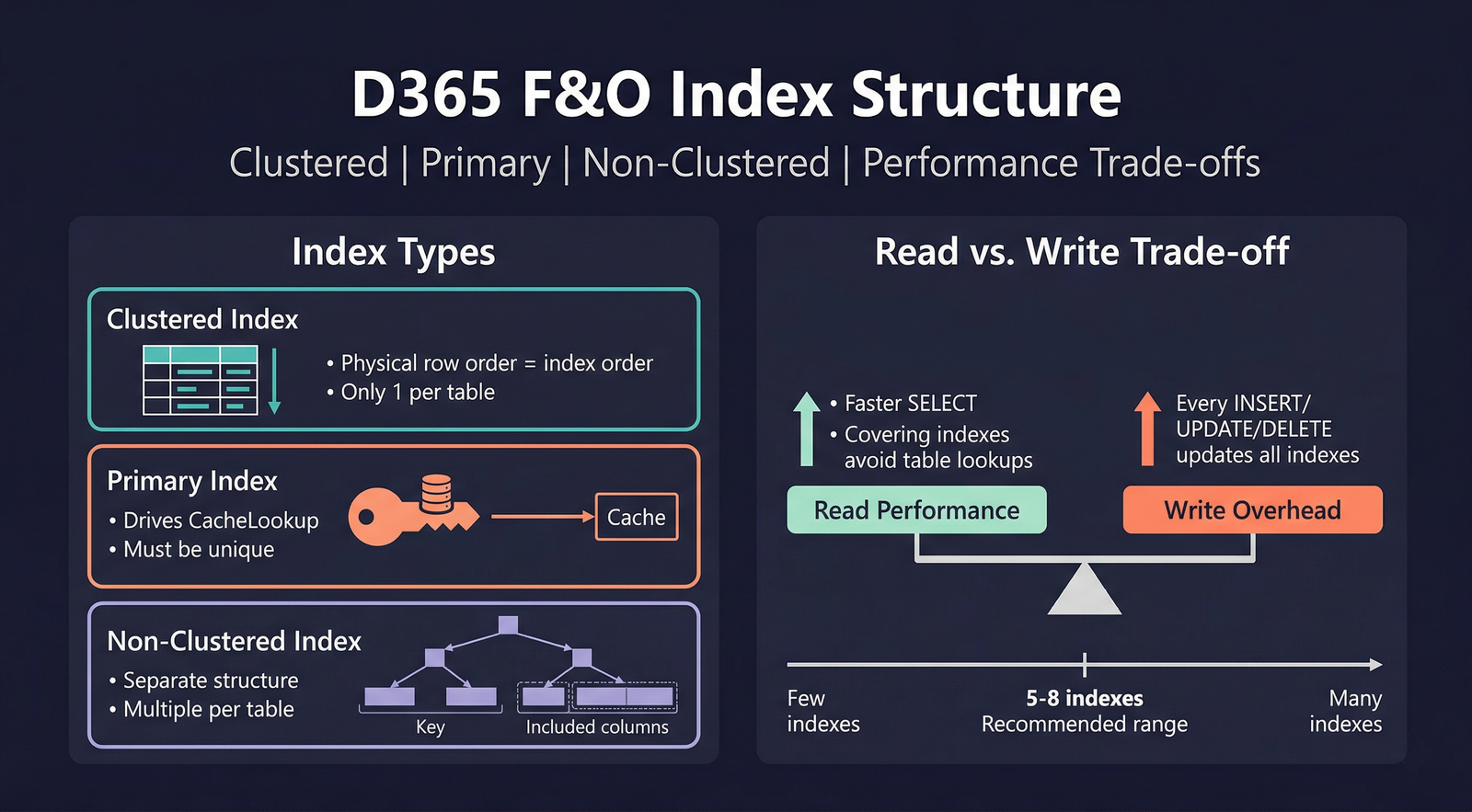
A clustered index determines the physical sort order of the data on disk. There can be only one clustered index per table because the data rows themselves can only be stored in one physical order.
Key characteristics:
- Range scans are fast — because rows are physically adjacent, queries that select a contiguous range of values (e.g., all transactions for a date range) are extremely efficient.
- Chosen carefully — changing the clustered index on a large table requires the entire table to be physically reorganised. Choose a key that matches the most common access pattern.
- Insert behaviour — if the clustered key is sequential (e.g.,
RecId, an auto-incrementing counter), new rows are always appended to the end, avoiding page splits. Random clustered keys (e.g., GUIDs) cause frequent page splits and fragmentation.
Best practice: Set the clustered index to the field combination that represents the most frequent range query or the most common sort order. For transaction tables, this is often a date field combined with an identifier. For lookup tables, the natural business key is usually appropriate.
Primary Index
The primary index identifies the logical primary key of the table. The D365 caching system uses the primary index to manage record caching — when CacheLookup is set to a value other than None, records fetched by the primary index fields are cached in memory.
Key characteristics:
- Must be unique — the primary index should have
AllowDuplicatesset to No. - Caching driver — the fields in the primary index define the cache lookup key. A select statement that filters by exactly these fields will hit the cache.
- Not necessarily the clustered index — the primary and clustered indexes can be different. The clustered index optimises physical I/O; the primary index drives caching.
If no primary index is explicitly set, D365 uses the RecId index as the default primary/clustered index.
RecId Index
When the table property CreateRecIdIndex is set to Yes, the system creates an index on the RecId field automatically. This is the default for most tables and ensures that lookups and joins by RecId are always efficient.
Performance: Benefits vs. Costs
Benefits
- Faster reads — queries that filter, sort, or join on indexed columns run orders of magnitude faster on large tables.
- Covering indexes — if all columns needed by a query are in the index (as key columns or included columns), SQL can satisfy the query entirely from the index without touching the base table.
- Uniqueness enforcement — unique indexes prevent duplicate data, serving a data integrity role.
Costs
- Write overhead — every
insert,update(on indexed columns), anddeletemust update all affected indexes. The more indexes a table has, the slower write operations become. - Storage — each index consumes disk space proportional to the number of rows and the size of the indexed columns.
- Maintenance — indexes can become fragmented over time, requiring periodic rebuilds.
Guidelines
| Guideline | Rationale |
|---|---|
| Aim for 5–8 indexes per table maximum | Beyond this, write performance degrades noticeably. |
| Index the fields you filter and join on | An index only helps if the query uses it. |
| Put the most selective column first | SQL Server reads the index left-to-right; leading with a high-cardinality column narrows faster. |
| Avoid indexing very wide columns | Large strings in an index increase its size and reduce effectiveness. |
Use IncludedColumn for covering | Add non-key fields as included columns to create covering indexes without affecting the key sort. |
| Review execution plans | Use SQL Server profiling tools to verify which indexes are actually being used. |
Adding indexes without analysis can harm performance. Each new index slows every write operation. Always profile before and after adding an index to confirm it provides a net benefit.
Alternate Keys
An index with AlternateKey set to Yes is treated as an alternate unique identifier for the record. Alternate keys can be used in data entity mappings and OData operations to identify records by natural business keys instead of RecId.
Valid Time State Keys
When a table uses the valid time state framework, one index must be designated as the ValidTimeStateKey. This index defines the business key plus the ValidFrom field, and the ValidTimeStateMode property (NoGap or Gap) controls how the runtime manages overlapping or gapped date ranges.
Index Structure Overview
Properties
| Property | Display Name | Type | Description |
|---|---|---|---|
| Index | |||
| Name | Name | String | The name of the element. |
| AllowDuplicates | Allow Duplicates | NoYes | Whether the index allows duplicate values. Values: No (0), Yes (1). |
| Enabled | Enabled | NoYes | Whether the index is active. Values: No (0), Yes (1). |
| AlternateKey | Alternate Key | NoYes | Whether the index is an alternate key. Values: No (0), Yes (1). |
| ValidTimeStateKey | Valid Time State Key | NoYes | Whether this index is the valid time state key. Values: No (0), Yes (1). |
| ValidTimeStateMode | Valid Time State Mode | ValidTimeStateMode | Gap behavior for valid time state keys. Values: NoGap (0), Gap (1). |
| IndexType | Index Type | IndexType | The type of the index. Values: Index (0), ColumnStore (1). |
| AllowPageLocks | Allow Page Locks | NoYes | Whether the index supports page-level locking. Values: No (0), Yes (1). |
| ConfigurationKey | Configuration Key | String | The configuration key assigned to the item. |
| IsSystemGenerated | Is System Generated | NoYes | Indicates whether the element was system-generated. Values: No (0), Yes (1). |
| IsManuallyUpdated | Is Manually Updated | NoYes | Indicates whether the element was manually updated. Values: No (0), Yes (1). |
| Index Field | |||
| Name | Name | String | The name of the element. |
| DataField | Data Field | String | The table field included in this index. |
| IncludedColumn | Included Column | NoYes | Whether this field is an included (non-key) column. Values: No (0), Yes (1). |
| Optional | Optional | NoYes | Whether this index field is optional. Values: No (0), Yes (1). |