Form Data Sources
A Form Data Source (AxFormDataSourceRoot) connects a form to its underlying data. Each data source references a single table (or view) and exposes its records to the form's controls and methods. A form can contain multiple data sources joined together to present related data in a single UI.
Data sources are the bridge between the data model and the user interface. They control how records are queried, which access rights users have, how data sources relate to each other, and how the form responds when the active record changes.
Data Source Architecture
Data sources form a hierarchy within the form. The first (top-level) data source is the primary data source — it drives the main grid or header fields. Additional data sources can be joined to the primary or to each other using the JoinSource and LinkType properties.
Join Types
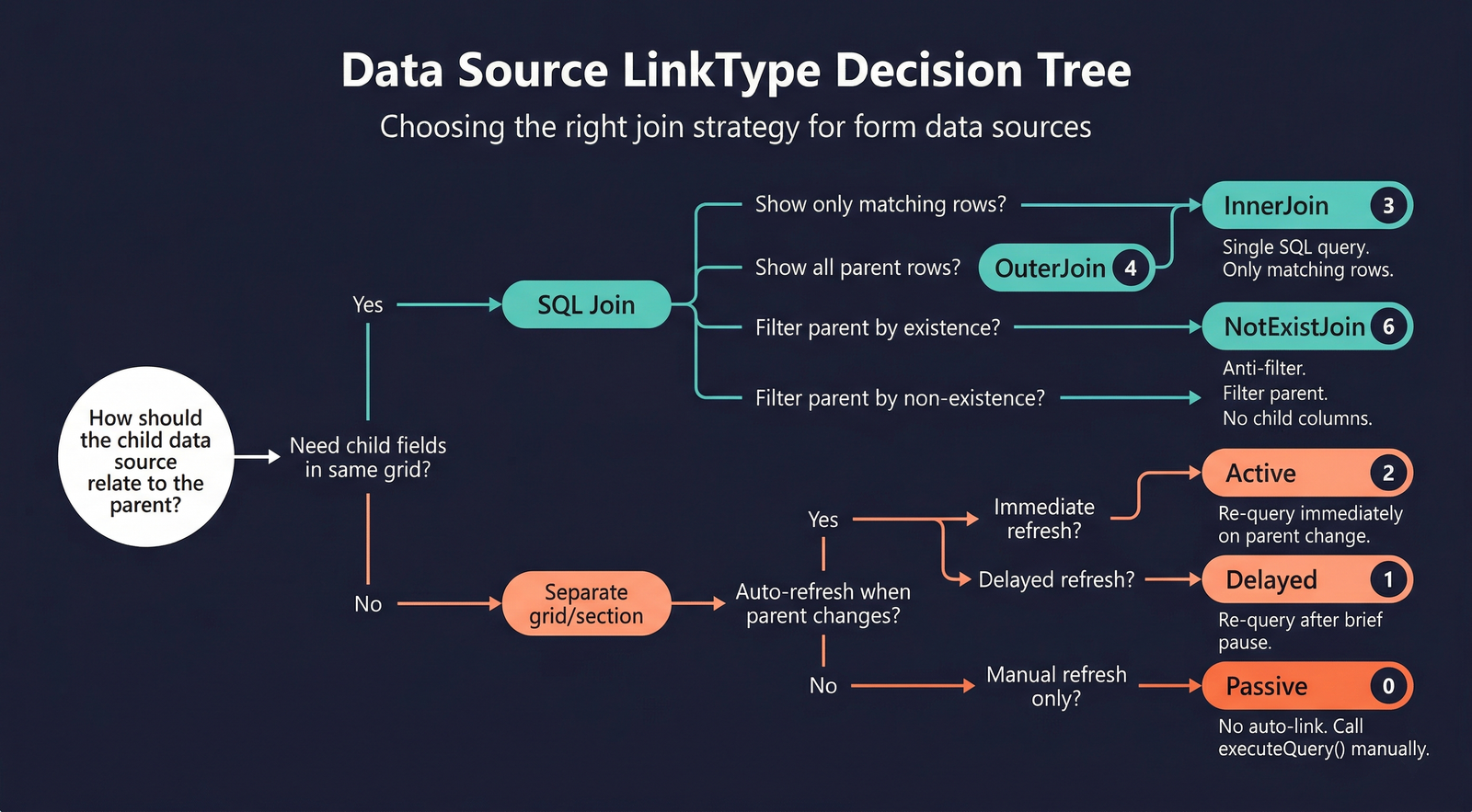
The LinkType property determines how a child data source relates to its parent:
| Value | Name | Behaviour |
|---|---|---|
| 0 | Passive | No automatic link. The child data source's query is not affected by the parent. You must manually call executeQuery() on the child when the parent record changes. |
| 1 | Delayed | Like Active, but with a short delay before refreshing the child data. Reduces database calls when the user scrolls quickly through parent records. |
| 2 | Active | The child data source is re-queried immediately whenever the active record changes on the parent. |
| 3 | InnerJoin | The child is inner-joined to the parent in a single SQL query. Only parent records that have matching child records are shown. |
| 4 | OuterJoin | The child is outer-joined to the parent. All parent records are shown; child fields are blank when no match exists. |
| 5 | ExistJoin | An existence join. Only parent records that have at least one matching child record are shown. The child fields are not displayed. |
| 6 | NotExistJoin | An anti-join. Only parent records that have no matching child records are shown. |
Use InnerJoin or OuterJoin when you need child fields displayed alongside parent fields in a single grid. Use Active or Delayed when the child data source drives a separate grid or detail section that refreshes independently.
How Joins Are Determined
When AutoQuery is set to Yes (the default), the framework automatically determines the join condition between data sources by looking at the table-level relations defined in the AOT. The process is:
- The framework examines the relations on the child data source's table.
- It finds a relation that references the parent data source's table.
- It uses that relation's field mappings as the join condition.
If no matching relation exists, or if the wrong relation is selected, you can override this by:
- Setting
AutoQueryto No and providing a manual query. - Modifying the query in the data source's
init()method. - Using the form-level
DataSourceQueryproperty to bind the form to an AOT query object that defines the joins explicitly.
Data Source Methods
Each data source has its own set of overridable methods. These methods participate in the form lifecycle and record operations.
init()
Initialises the data source's query object. Override to modify the query structure at startup — add ranges, change sort orders, or add extra data sources dynamically. See Code Examples for patterns.
executeQuery()
Sends the query to the database and populates the data source with results. This is the recommended entry point for dynamic filtering — override it to modify ranges based on user input before calling super(). See Code Examples for patterns.
active()
Called when the current record changes. Returns an integer (the record count). Override to enable/disable controls or update calculated displays based on the current record.
create()
Called when a new record is about to be created. Override to set pre-creation defaults or control creation logic.
initValue()
Called on the table buffer after create() to set default field values for the new record.
write()
Called when a record is saved. Delegates to Table.insert() or Table.update() depending on whether the record is new or existing.
validateWrite()
Called before write(). Returns false to prevent the save. Override to add form-level validation that supplements the table's own validateWrite().
delete()
Called when the user deletes a record. Override to add confirmation dialogs or cascade-delete related data.
validateDelete()
Called before delete(). Returns false to cancel the deletion.
leave()
Called when focus is about to move away from the current record. Returns false to prevent the navigation (e.g., force the user to complete a required field).
leaveRecord()
Called after leave() succeeds. The record is about to lose focus. If the record has been modified, the framework triggers validateWrite() and write() before proceeding.
Properties
The full data source property set is a combination of properties inherited from AxFormDataSource (abstract base) → AxFormDataSourceConcrete → AxFormDataSourceRoot.
| Property | Display Name | Type | Description |
|---|---|---|---|
| Inherited (base)AxFormDataSource | |||
| Name | Name | String | The name of the element. |
| Tags | Tags | String | Tags for this element separated by semicolon. |
| Table | Table | String | Specifies the name of the table used as the data source. |
| Concrete / rootAxFormDataSourceRoot | |||
| AutoSearch | Auto Search | NoYes | Specifies whether the system automatically performs a search on the data source. Values: No (0), Yes (1). |
| AutoNotify | Auto Notify | NoYes | Notify automatically upon change of record. Values: No (0), Yes (1). |
| AutoQuery | Auto Query | NoYes | Specifies whether a query is automatically generated for this data source and the data sources it is joined to as specified in the JoinSource property. Values: No (0), Yes (1). |
| CrossCompanyAutoQuery | Cross Company Auto Query | NoYes | Specifies whether the data source can retrieve data from more than one company. Values: No (0), Yes (1). |
| OnlyFetchActive | Only Fetch Active | NoYes | Specifies whether all fields in the data source should be fetched, or only those that are used by controls on the form. Also disables record deletion from the form. Best used in lookup forms. Values: No (0), Yes (1). |
| JoinSource | Join Source | String | Specifies the parent data source to join to the current data source. |
| LinkType | Link Type | DataSourceLinkType_ITxt | Specifies the type of the link to establish with the joined data source. Values: Passive (0), Delayed (1), Active (2), InnerJoin (3), OuterJoin (4), ExistJoin (5), NotExistJoin (6). |
| DelayActive | Delay Active | NoYes | Enables delayed execution of the active method for the data source. Values: No (0), Yes (1). |
| AllowCheck | Allow Check | NoYes | Specifies whether security checking occurs before or after the form opens. Values: No (0), Yes (1). |
| AllowEdit | Allow Edit | NoYes | Specifies whether a user can make changes to a record in the table of the data source. Values: No (0), Yes (1). |
| AllowCreate | Allow Create | NoYes | Specifies whether a user can create a record in the table of the data source. Values: No (0), Yes (1). |
| AllowDelete | Allow Delete | NoYes | Specifies whether a user can delete a record from the table in the data source. Values: No (0), Yes (1). |
| MaxAccessRight | Max Access Right | AccessRight | Specifies the maximum access right of the table. Values: NoAccess (0), View (1), Edit (2), Add (3), Correction (4), Delete (5). |
| StartPosition | Start Position | DataSourceStartPosition_ITxt | Specifies whether to make the first or last record the current record when the form opens. Values: First (0), Last (1). |
| InsertAtEnd | Insert At End | NoYes | Specifies whether to automatically create a new record when the user moves focus past the last record in the table. Values: No (0), Yes (1). |
| InsertIfEmpty | Insert If Empty | NoYes | Specifies whether to display a blank record if there are no records in the table. Values: No (0), Yes (1). |
| ValidTimeStateAutoQuery | Valid Time State Auto Query | ValidTimeStateAutoQuery | Specifies the type of query for date-effective data. Values: AsOfDate (0), DateRange (1). |
| ValidTimeStateUpdate | Valid Time State Update | ValidTimeStateUpdate | Specifies the type of update to use for an existing date-effective record. Values: CreateNewTimePeriod (1), Correction (2), EffectiveBased (3). |
| OptionalRecordMode | Optional Record Mode | OptionalRecordMode | Specifies the create and delete behaviour for records that have an outer-joined table. Values: None (0), ImplicitCreate (1), ExplicitCreate (2). |
| CounterField | Counter Field | String | Specifies the field to use as a counter for the form. The field must be of type real and an index on the table that underlies the data source. |
| Index | Index | String | Specifies the default index used to sort data on the form. |