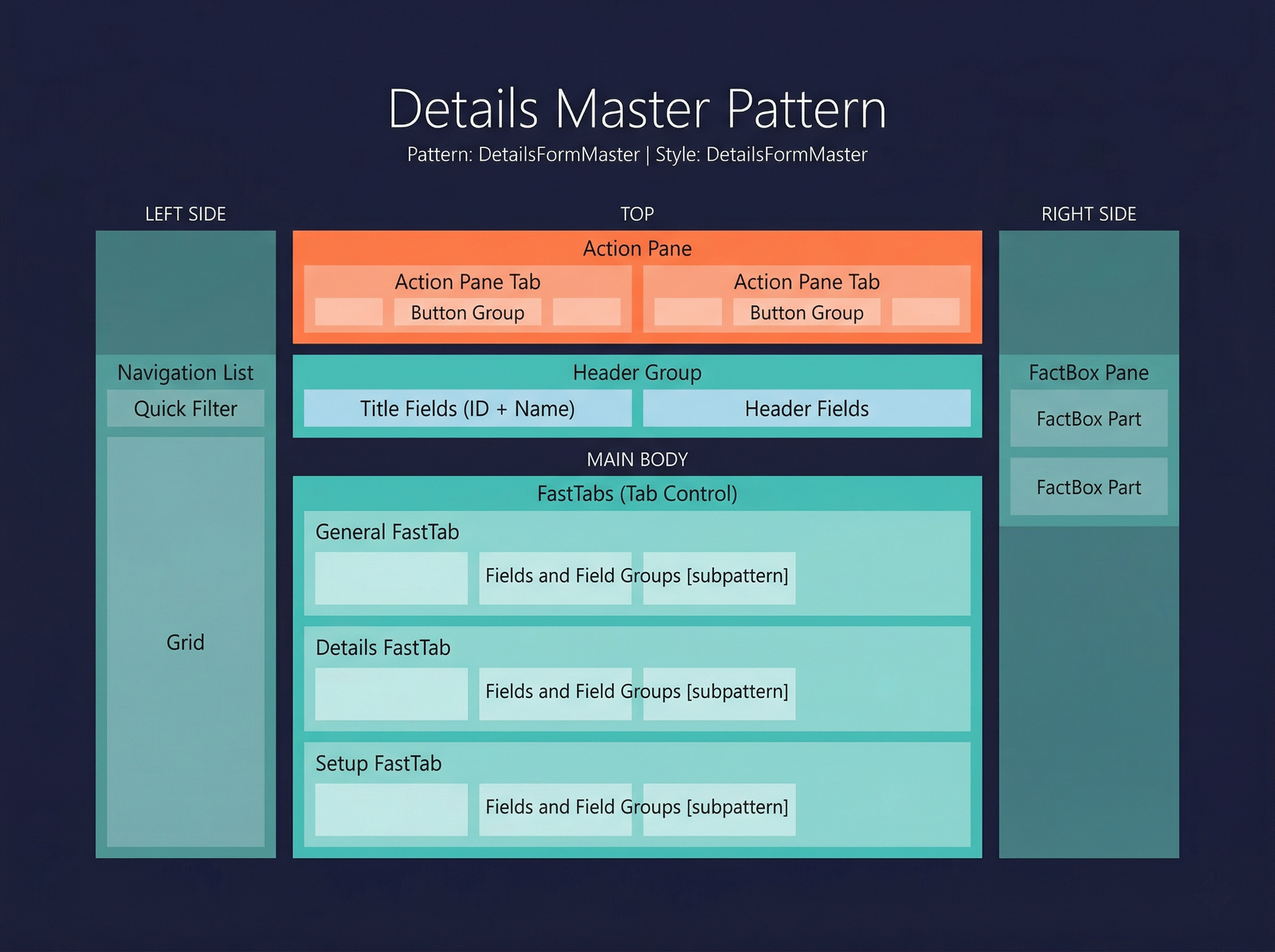
Details Master
The Details Master pattern is the standard form pattern for viewing and editing a single master-data record with its full set of attributes. It is the most widely used pattern in D365 F&O and is appropriate for any entity where a user needs to see comprehensive detail about one record at a time — customers, vendors, items, fixed assets, and so on.
When to Use
- The form displays a single primary record with many fields organised across multiple groups.
- The data is master data or reference data (not transactional documents with header/lines).
- Users need to create, read, update, and delete records directly on the form.
- A navigation list (grid or list) is needed so users can switch between records without leaving the form.
- The record has enough attributes to warrant FastTabs (collapsible sections) to organise the information.
Variations
Details Master (Standard)
The default variant. Contains an action pane, an optional navigation list, a header section, and one or more FastTabs for the record's fields.
Details Master with Standard Tabs
Adds a full tab control (with tab pages rendered as visual tabs rather than FastTabs) below or within the FastTab area. Use this when the record has distinctly separate categories of information that benefit from tabbed navigation in addition to FastTabs.
Key Components
| Component | Control Type | Required | Description |
|---|---|---|---|
| Action Pane | AxFormActionPaneControl | Yes | The ribbon-style toolbar at the top of the form. Contains action pane tabs with button groups. |
| Navigation List | AxFormGridControl | No | A collapsible left-side panel showing a grid of records. Allows record navigation without opening a separate list page. |
| Header Group | AxFormGroupControl | Yes | A non-collapsible region at the top of the detail area showing the record's key identifier fields (e.g., Account Number, Name). |
| FastTabs | AxFormTabControl + AxFormTabPageControl | Yes | The main body of the form. Each tab page renders as a collapsible FastTab. At least one FastTab is required. |
| FactBox Pane | Framework-managed | No | A right-side panel containing read-only form parts (FactBoxes) that show related information. |
Example Forms in D365 F&O
| Form | Menu Item | Description |
|---|---|---|
CustTable | Accounts receivable → Customers → All customers | The customer master form. Uses the standard Details Master pattern with a navigation list, header group (Account, Name), and FastTabs for General, Addresses, Contact information, etc. |
VendTable | Accounts payable → Vendors → All vendors | The vendor master form. Structurally identical to CustTable. |
InventTable | Product information management → Products → Released products | The released product master. A Details Master with an extensive set of FastTabs covering inventory dimensions, purchase, sell, and engineer attributes. |
AssetTable | Fixed assets → Fixed assets → Fixed assets | The fixed asset master. Uses Details Master with FastTabs for valuation, technical information, and financial dimensions. |
Infographic Placeholder