List Page
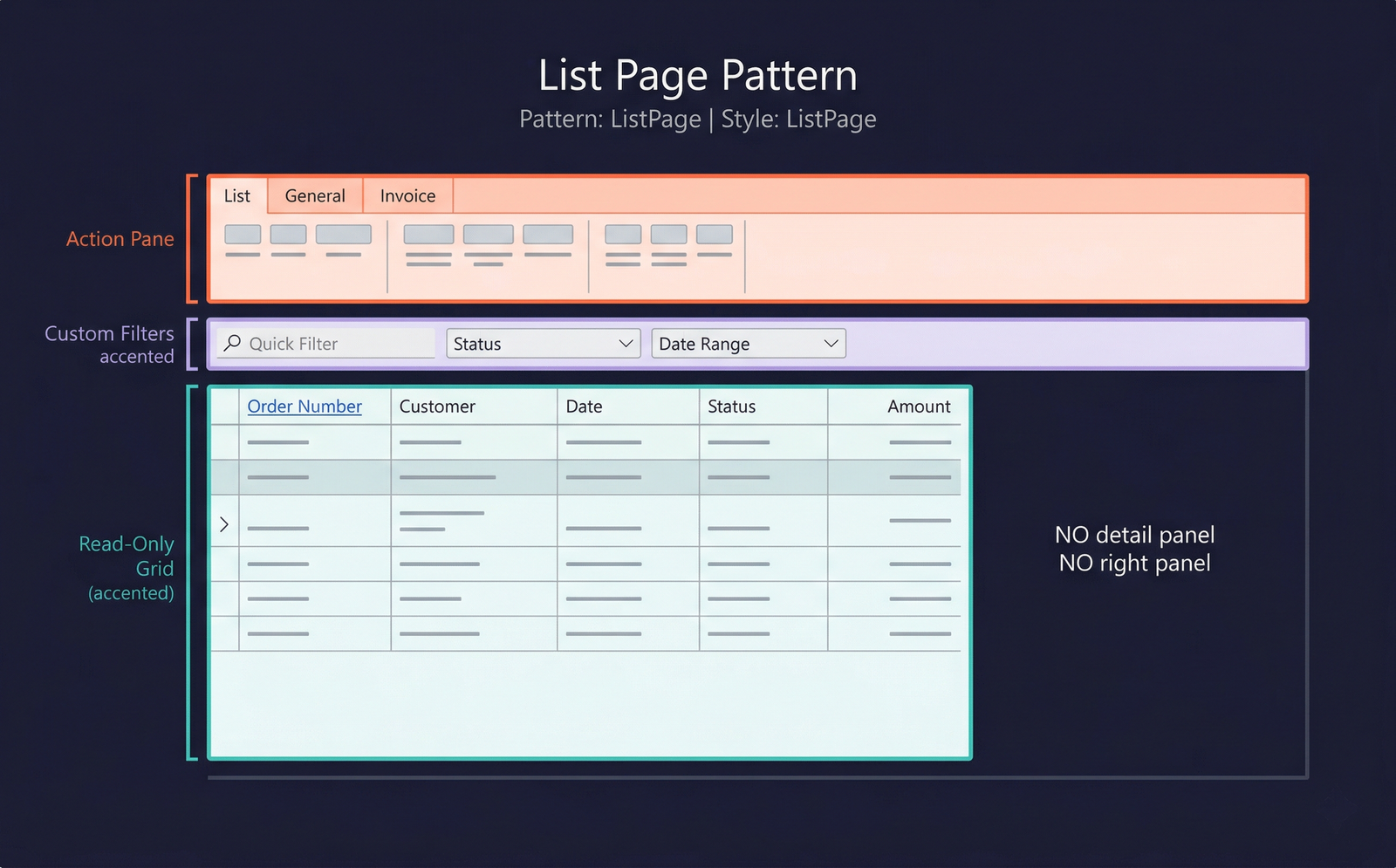
The List Page pattern presents a read-only grid that acts as a navigation hub for an entity. Users browse and filter records in the grid, then open a detail form (typically a Details Master or Details Transaction form) to view or edit the full record. List pages are the standard entry point for most business entities in D365 F&O.
When to Use
- The primary purpose of the form is browsing and filtering a collection of records, not inline editing.
- The form acts as a navigation hub — users select a record and open it in a details form.
- The entity has a large dataset that benefits from filters, sorting, and column customisation.
- An Action Pane with contextual actions (New, Edit, Delete, Print, post actions) is needed.
- The form should support saved views and personalisation of columns and filters.
note
In D365 F&O, many entities combine the List Page and Details Master into a single form using the Details Master pattern with a navigation list. However, standalone List Page forms still exist for entities where the list and detail are separate (e.g., SalesTableListPage).
Variations
The List Page pattern does not have formal named variations. Optional elements include:
- Custom filters — filter fields above the grid using the Custom Filters subpattern.
- Preview pane — a lower section showing a read-only preview of the selected record (less common in F&O vs. AX 2012).
Key Components
| Component | Control Type | Required | Description |
|---|---|---|---|
| Action Pane | AxFormActionPaneControl | Yes | A full-width ribbon with multiple tabs. The first tab typically contains New, Edit, and Delete actions. Additional tabs provide domain-specific operations. |
| Custom Filter Group | AxFormGroupControl | No | A group above the grid with Quick Filter and optional custom filter fields. Uses the Custom Filters subpattern. |
| Grid | AxFormGridControl | Yes | A read-only grid showing multiple records. The key column typically renders as a hyperlink that opens the detail form. |
Example Forms in D365 F&O
| Form | Menu Item | Description |
|---|---|---|
SalesTableListPage | Accounts receivable → Orders → All sales orders (list view) | A list page for sales orders showing Order number, Customer, Date, Status, and Amount. Clicking an order opens the SalesTable Details Transaction form. |
PurchTableListPage | Accounts payable → Purchase orders → All purchase orders (list view) | Purchase order list page. Mirrors the sales order list page structure. |
CustTableListPage | Accounts receivable → Customers → All customers (list view) | Customer list page. In many configurations, this redirects to the CustTable Details Master with navigation list. |
BudgetPlanListPage | Budgeting → Budget plans → All Budget plans | A list page for budget plans with filters for budget planning process and stage. |
Infographic Placeholder