Details Transaction
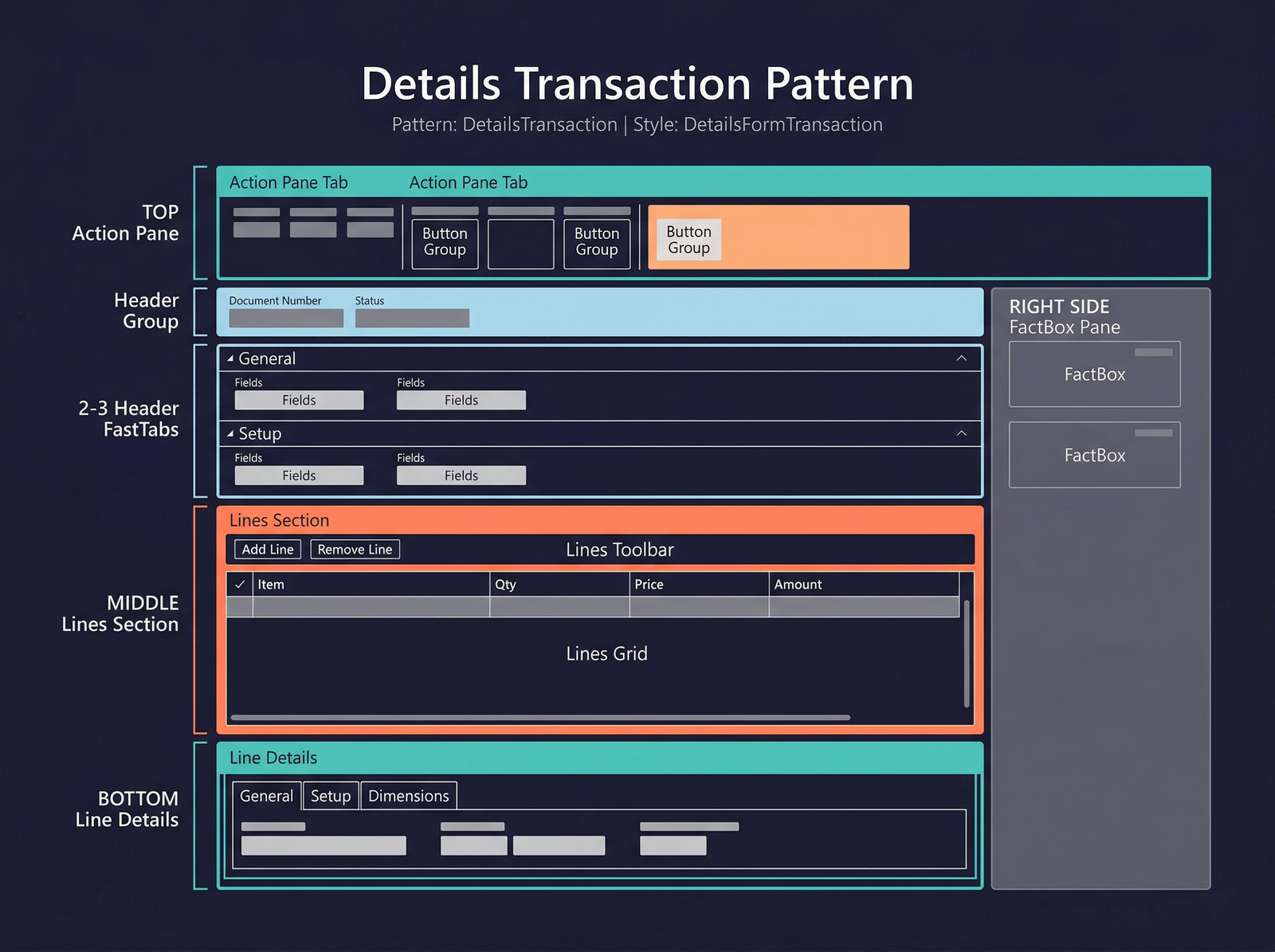
The Details Transaction pattern is the standard form pattern for transactional documents that have a header–lines structure. Purchase orders, sales orders, free-text invoices, and journals all follow this pattern. It extends the Details Master concept by adding a dedicated lines grid and an optional line-details section below the header.
When to Use
- The form represents a document with a header record and multiple line records (e.g., order header + order lines).
- Users need to create and edit both the header and lines on the same form.
- The header contains document-level attributes (customer, date, status) and the lines contain item-level detail (item, quantity, price).
- A line-details region is needed so users can see and edit extended attributes of the selected line without opening a separate form.
Variations
Details Transaction (Standard)
The default variant. Header FastTabs at the top, a lines grid in the middle, and a line-details tab control at the bottom.
Details Transaction with Lines FastTabs
A variation where the lines grid sits inside a FastTab alongside the header FastTabs, rather than in a fixed middle section. Used when the line grid needs to share equal visual weight with other header sections.
Key Components
| Component | Control Type | Required | Description |
|---|---|---|---|
| Action Pane | AxFormActionPaneControl | Yes | Top-level ribbon with document actions (Post, Confirm, Print, etc.). |
| Header Group | AxFormGroupControl | Yes | Non-collapsible region showing the document identifier and status. |
| Header FastTabs | AxFormTabControl | Yes | Collapsible sections for header-level attributes. |
| Lines Grid | AxFormGridControl | Yes | The grid showing document lines. Bound to the line data source. |
| Lines Toolbar | AxFormGroupControl | No | An optional toolbar above the lines grid with line-specific actions (Add line, Remove line). Uses the Toolbar and List subpattern. |
| Line Details | AxFormTabControl | No | A tab control below the lines grid showing extended detail for the currently selected line. Uses standard tab pages, not FastTabs. |
| FactBox Pane | Framework-managed | No | Right-side info parts. |
Example Forms in D365 F&O
| Form | Menu Item | Description |
|---|---|---|
PurchTable | Accounts payable → Purchase orders → All purchase orders | The purchase order form. Header contains vendor, delivery date, and terms; lines contain items, quantities, and prices. Line details show extended pricing, delivery schedule, and financial dimensions. |
SalesTable | Accounts receivable → Orders → All sales orders | The sales order form. Mirrors the purchase order structure from the selling side. |
LedgerJournalTable | General ledger → Journal entries → General journals | The general journal form. Header identifies the journal batch; lines are individual voucher entries with accounts and amounts. |
FreeTextInvoice | Accounts receivable → Invoices → All free text invoices | A free-text invoice without a backing sales order. Header contains customer and invoice details; lines contain revenue account and amount. |
Infographic Placeholder